5thGenRams Forums

Register a free account today to become a member! Once signed in, you'll be able to participate on this site by adding your own topics and posts, as well as connect with other members through your own private inbox!

HOW TO: Add 360 Surround View Camera System

Vincentw57, can you please tell, or anyone, how did you go from your side mirror to the inside of the truck. There was no detail. Please help
There is a door harness that you can run it through. If you need more details, look into the thread about adding passive entry.
 
Remember that you need different tailgate handle as camera is bigger. Also connector is different.
If I understand you, the existing backup camera on my truck handle doesn't work with the 360 surround view camera system? Is that correct?
 
If you're in need of a new cvpm, I've got one that I'll make you a deal on! I bought it brand new from the mopar store and then ended up buying a used one so I didn't have to calibrate the new one!
Do you think a blue screen camera unavailable can be a defective cvpm? I’ve had the blue screen for about 2 months checked all cables and camera with no luck. Cameras are the only issue I have.

Thoughts?
Thanks
 
If I understand you, the existing backup camera on my truck handle doesn't work with the 360 surround view camera system? Is that correct?
That's correct. That's why it's listed in the parts list and explained in the first post.
 
My 2020 Limited already has 360 camera, but I'm looking to do the UC5 upgrade from infotainment.. If i buy the UC5 CVPM Part Number 56029968AF would I be able to do the calibration via AlfaOBD and MX+? I'm basically looking to see if i can do the UC5 upgrade without any dealer intervention.
 
My 2020 Limited already has 360 camera, but I'm looking to do the UC5 upgrade from infotainment.. If i buy the UC5 CVPM Part Number 56029968AF would I be able to do the calibration via AlfaOBD and MX+? I'm basically looking to see if i can do the UC5 upgrade without any dealer intervention.
Yes, you can. You can also do the UC5 upgrade much cheaper if you do it all yourself.
 
Tackled this yesterday along with passive entry. Harnesses from Jimmy were top notch! For the parts used, I've included those at the bottom. I am running into an issue though.

Everything is hooked up and programmed with Alfa. No issues there. Surround view comes up and I can select each camera with the soft keys. Went this morning to an empty lot that has plenty of distance. Followed the calibrating steps and everything calibrated without issue, well so I thought. If I have Alfa connected, surround view works as it should, I get the birds eye view with the lines in the front and back, and I can see the surroundings around me. However, once I disconnect alfa, it immediately goes black around the truck, as if I did not calibrate yet. Reconnect Alfa, and it works fine again. I decided to calibrate again and what I did notice when the front was calibrating, Alfa did not step though the progress, it just stayed on the initial "Calibration Status: Front camera running", "Calibration results: no errors". The other camera restated this multiple times through the iteration. On the Uconnect screen, the speed and steering wheel were green, The big bottom arrow was green and the little direction arrow was yellow. Subsequent calibration attempts would give mixed results, Uconnect would show successful, but Alfa would show fail, vice versa, or both fail or both pass. No matter the combo, it reverts back to the pre-cal look once I select disconnect in Alfa. Any pointers would be super helpful!

Decided to come back to the house, recheck everything for the front, do some research and go at it again later.

Mirrors: Truck had powerfold and heated mirrors. So I found replacements that have powerfold, heated, bsm and camera
Left: 68610319AA
Right: 68610318AA
CVPM: 56029968af
For the tailgate and grill camera, I bought used Pacifica mirrors off eBay and cann'd. Note, one of the camera was an older 68144068AC and I will have to double check, but I think that one is in the front grill (See above issues....Uggh)

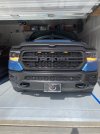
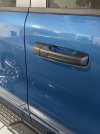
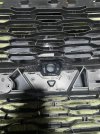
With the BTS edition, I have the textured black tailgate and a grill that does not have the replaceable emblem plinth, so I had to modify the grill. cut out the camera mount from a plinth and epoxied it in. The back is reinforced with wire mesh used with bondo, it is not going anywhere! Since I was doing the passive entry also, I sanded the tailgate handle (and door handles) and used the SEM plastic restore and paint system. Plastic adhesion, base primer, texture coating, matt paint layer and finished with a matt HS clear. I am pleased with the results.

A side note. I originally ordered tailgate handle 6RN80GXHAA as mentioned in this thread for those wanting the matt black style handle. When I got mine, the part number on it was correct but it was definitely not matt black. It was more of a satin and completely smooth. It also had no led cutout to switch mine over. That's why I ended up just getting the diamond black like the handles and painting them.

Front Grill.jpgHandle.jpgMount Back.jpg
 
Hi all. First Happy Veterans Day!

I had some time over the last few days to check over the install (all good) and read through this thread again, this time keying in on posts that are similar or could be relevant to what I saw on Saturday. I went out mid-morning and attempted to follow this post the best I could:

HOW TO: Add 360 Surround View Camera System

I am very thankful and relieved to pas along all is calibrated and working as intended! I ran some errands afterwards, truck was shut-off a few times and all calibrations stayed with surround birds eye still holding.

Since I was at it, I also followed this post from Jimmy to enable the camera if Park Sense is triggered. Works as advertised:

Activate front camera automatic park sense

Next up, BSM retrofit....
 
Carrie, thanks for the info and your thinking process. I'm in the same situation as you regarding the emblem plinth. I was trying to figure out what I was going to do since I couldn't remove mine on the Rebel, but you had a great idea and I will try that method. If you had to do it again would you do anything different as far as mounting the camera on your grill emblem?
 
If you're in need of a new cvpm, I've got one that I'll make you a deal on! I bought it brand new from the mopar store and then ended up buying a used one so I didn't have to calibrate the new one!
Zjmuss, did you sell the cvpm?
 
Carrie, thanks for the info and your thinking process. I'm in the same situation as you regarding the emblem plinth. I was trying to figure out what I was going to do since I couldn't remove mine on the Rebel, but you had a great idea and I will try that method. If you had to do it again would you do anything different as far as mounting the camera on your grill emblem?
I think for what needed to be done, it was the best outcome I could come up with. I did use previous posts from others who also had to splice it in, each took a different approach. This to me had the least amount of cutting but maybe more fine tuning? I cut it bigger and used my Dremel with a fine carving tip to shave it down to the stamped ridge line around the top and sides, that way I could get the fit as tight as possible. Then with the black epoxy, I squeezed that into the opening a little bit at a time and used microfiber q-tips to press it in and smooth it out.

Good luck!
 
Questions

I'm trying to order a replacement tailgate handle part# 6RN80***AA (replace *** with paint code). My paint code 2019 is PWD I can't seem to find the part with that replacing the asterisks. Is PWQ Tri coat pearl the same as the Pearl white on my truck or do I use a different part number?

Also, I would assume once I swap out the tailgate handle with the proper surround camera can I just extend the Maroon Fakra connection behind the radio to the CVPM rather than run a whole new cable from the tailgate?

Does someone have the pinout for the CVPM so I can make my own harness?

Finally, I think I may have messed up. I ordered a 68451000AE CVPM I have a 2019 with Uconnect 4 12" screen. I have newer Tow Mirrors 68446974AA Right and a 68446975AA Left mirror coming. I will be getting my BCM updated to 22 or a new 23 programmed by the dealer. Will this CVPM work or do I need to get a 68318033AI?

Thanx!
 
Last edited:
After installing the 360 Surroundview Camera System, I decided to put this together to help others. I know there are several others who have done this. If you have any extra input, please let me know. I will start with the parts list first. Make sure to read the notes. You may need to find the correct part number depending on your configuration or color. It was about $1200 using used items. About $2200 new.

Parts List
1 of CVPM - 68318033AI (Uconnect 4) or 56029964AF (UConnect 5)- This goes in the passenger kick panel. It comes with the mounting bracket.
4 of Camera - 68144068AD - It is the same camera. To save money, I bought used mirrors off of eBay and took the cameras out of them. The mirrors don't need to be in good condition.
1 of Driver Side Mirror - 68276511AG - These vary depending on blind spot monitoring, cap colors, and other options. I bought used ones from eBay.
1 of Passenger Side Mirror - 68276510AH - These vary depending on blind spot monitoring, cap colors, and other options. I bought used ones from eBay.
1 of Front Camera RAM Mount - 68341467AC - This could be different depending on the grill you have.
1 of Front Camera Bracket 1 - 68341480AB - Holds the front camera in the RAM mount.
1 of Front Camera Bracket 2 - 68365873AB - Holds the front camera in the RAM mount.
1 of Tailgate Handle - 6RN80GW7AA - This will vary depending on the color and type of tailgate you have. Replace GW7 with your color code that you can find on the placard on the inside of the driver side door.
1 of 68529657AA - Tailgate handle spacer. This holds the camera in the tailgate handle.
1 of 16.5' Fakra Z - Male to Female Amazon.com - Front Camera to CVPM
1 of 10' Fakra Z - Female to Female Amazon.com - Driver Side Mirror to CVPM
2 of 6' Fakra Z - Female to Female Amazon.com - Pass Side Mirror to CVPM, CVPM Output to Radio
1 of 6' Fakra Z - Male to Female Amazon.com - Rear Camera from Radio to CVPM
1 of 3' Fakra Z - Male to Female Amazon.com - Tailgate Camera Adapter
2 of #6 3/8 Stainless Screws - These are needed to install the front camera in the RAM
1 of Front Camera Jumper Harness - 68322480AD - This isn't really necessary, but it allows you to disconnect the camera easier when removing the grill.
1 of Wiring Harness for CVPM - Jimmy07 can make this for you. Just send him a PM.


Keep in mind that some of the parts listed above need to be researched depending on options on your truck.

The install is pretty simple, but time consuming. I am not going to go into detail on each item. I will give an overview. You can find videos and instructions on removing the items on YouTube and here.

Front Camera:
You need to remove the grill. Once it is removed, you need to remove the RAM letters and replace it with the new one with the camera. Too me, this was the longest part of the build. You can install the jumper harness now too.

Rear Camera:
You need to remove the tailgate handle and replace it with the one with the new camera. And NO, you cannot use the old camera. The new cameras have a wider degree of view. Use the Tailgate Camera Adapter cable in between the factory cable and the new camera.

Driver's side and Passenger side:
Replace the mirrors with the new ones. You will need to install the cameras in the mirrors unless you bought used ones off that already have them installed.

Running the cables:
I ran the front cable down the driver's side and went through one of the firewall rubber gaskets. Make sure to seal it back. I then ran the driver's side mirror and this one together under the dash over to the CVPM. The passenger side doesn't need much running as it is right there. You need to remove the radio. You will unplug the rear camera and plug in the cable to run it to the CVPM. Then plug the other cable into the radio and run it to the CVPM.

CVPM Install:
Remove the passenger side kick panel and install the CVPM. You can hook up all the cables. The CVPM is labeled for the different cameras. Then hookup the wiring harness and run it over to the fuse box. Make sure to plug it into one that comes on with remote start.

AlfaOBD Changes:
You will need an MX+ or switch the cables around. Again, I am not going to go into this as there is information about it already. If you have issues finding the settings, use the search in AlfaOBD.

VehConfig 1: Rear View Camera- NO
VehConfig 2: CHMSL Camera- NO
VehConfig 7: Full Central Vision Processing Present- YES
ECUConfig 3: Rear Camera Present- NO
Radio & Connectivity: Rearview Camera Zoom Buttons Present- YES
Radio & Connectivity: Surround View Camera On/Off Softkey Present- YES
CustSetMenu 1: Rear View Camera Gridlines CSM Present- NOT PRESENT
CustSetMenu 1: Rear Camera CSM Present- NO
CustSetMenu 2: Rear View Camera Delay CSM Present- NO
CustSetMenu 2: Surround View Camera Gridlines CSM Present- YES
CustSetMenu 2: Surround View Camera Delay CSM Present- YES
Cabin Net: CVPM Central vision processing- ENABLE

Once you do this, you should be able to at least see the front and rear cameras in the surround view display. You will now need to calibrate the surround view cameras. This is what you need the MX+ for. Plug in the MX+ using the SGW Bypass. You'll have to calibrate the cameras when you're done. Find an area that you can drive straight at about 4mph for about 400'. Connect to the CVPM in the radio module list. Run the camera calibrations individually for each camera.

Enjoy your new camera system. If you have questions, please post them in here. If I get more time, I will add more details. If anyone has more details to add, let me know and I will add them.

I am going to add this to mine eventually thanks for the post great parts list I appreciate it to start from finish wonder how long it took you to do it?
 

Users who are viewing this thread

Back
Top