
5thGenRams Forums
You are using an out of date browser. It may not display this or other websites correctly.
You should upgrade or use an alternative browser.
You should upgrade or use an alternative browser.
New OTA Update for Uconnect Software
- Thread starter Rammy1201
- Start date

This is a very subjective question. Not everyone will get every update.Anyone got the OTA update completed for their 12 inch Uconnect? I just got mine and CarPlay connection appears to be more stable but too early to tell. Anyone else?
Sent from my iPhone using Tapatalk

- Joined
- Jun 8, 2021
- Messages
- 5,469
- Solutions
- 1
- Reaction score
- 10,475
- Points
- 113
People on the RHO forum are reporting OTA updates, but all I've seen is a screen message that calls it "R5T". That doesn't sound like a Uconnect5 version - can you confirm that it's actually a Uconnect update? Like, what is your new version number?
People on the RHO forum are reporting OTA updates, but all I've seen is a screen message that calls it "R5T". That doesn't sound like a Uconnect5 version - can you confirm that it's actually a Uconnect update? Like, what is your new version number?
Same. I got the R5T or RT5 message after it finished updating. My software shows this:
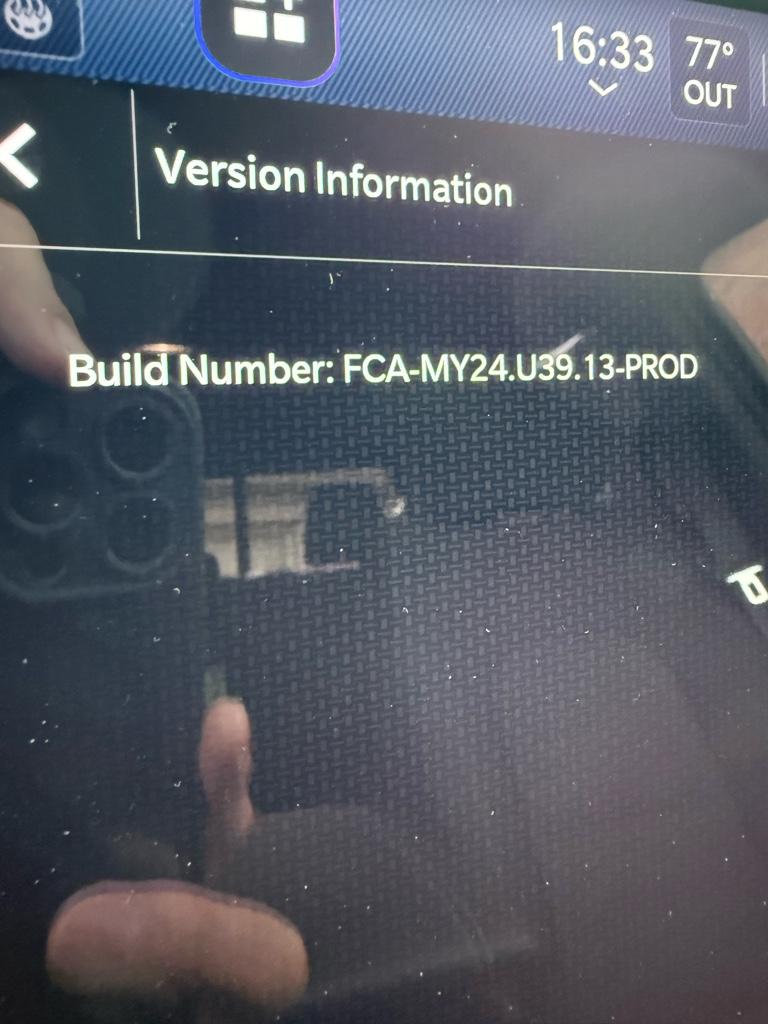
Sent from my iPhone using Tapatalk
This is a very subjective question. Not everyone will get every update.
I had no idea. I thought all Uconnect 12 inch screens would get same updates
Sent from my iPhone using Tapatalk
- Joined
- Jun 8, 2021
- Messages
- 5,469
- Solutions
- 1
- Reaction score
- 10,475
- Points
- 113
39.13 has been out for quite some time (possibly back to July 2025). And after searching some threads elsewhere, this R5T update has been being pushed out since October at least. Still not sure what it is, since it doesn’t seem to be a newer Uconnect version. But it’s has surged lately.
A short while back, RamCares stated that they were pausing all OTA updates because of some problems. Maybe they’ve just resumed the campaign.
A short while back, RamCares stated that they were pausing all OTA updates because of some problems. Maybe they’ve just resumed the campaign.

skny
Member
- Joined
- Dec 14, 2020
- Messages
- 24
- Reaction score
- 18
- Points
- 3
- Age
- 54
Received one today for my 2026 Big Horn. Took about 26 minutes. Believe it was for resolving connectivity issues when I read the “What’s new” info afterwards. No noticeable changes for me yet. But everything more or less worked before anyway.
- Joined
- Apr 11, 2019
- Messages
- 2,510
- Reaction score
- 3,020
- Points
- 113
R5T is the telematics box update, not a radio update. The telematics box is the same thing as the Uconnect box (this fixes the “Uconnect box requires service” message some people constantly get). It’s for the connected services, and this has been an update since August or September. They paused all OTA updates for a while, so they must have just started them back up again.Same. I got the R5T or RT5 message after it finished updating. My software shows this:
Sent from my iPhone using Tapatalk
R5T is the telematics box update, not a radio update. The telematics box is the same thing as the Uconnect box (this fixes the “Uconnect box requires service” message some people constantly get). It’s for the connected services, and this has been an update since August or September. They paused all OTA updates for a while, so they must have just started them back up again.
Ah. Where can I see the software version?
Sent from my iPhone using Tapatalk
- Joined
- Apr 11, 2019
- Messages
- 2,510
- Reaction score
- 3,020
- Points
- 113
You don’t. R5T is the new version for the telematics box.Ah. Where can I see the software version?
Sent from my iPhone using Tapatalk

Granite Goat
Active Member
- Joined
- Dec 14, 2025
- Messages
- 57
- Reaction score
- 43
- Points
- 18
Same for me (2026 Big Horn)Received one today for my 2026 Big Horn. Took about 26 minutes. Believe it was for resolving connectivity issues when I read the “What’s new” info afterwards. No noticeable changes for me yet. But everything more or less worked before anyway.
virtitnerd
New Member
- Joined
- Dec 3, 2025
- Messages
- 1
- Reaction score
- 0
- Points
- 1
- Age
- 25
Interesting, my ‘26 Big Horn came on U39P-2 which sounds to be an older version than others have.
Maybe this is why I have CarPlay disconnect issues and TomTom widget gets stuck on just loading most times
Maybe this is why I have CarPlay disconnect issues and TomTom widget gets stuck on just loading most times

azzx
Ram Guru
Looks like this update has fixed my chronic UConnect error (5 visits to the dealer since 2nd month ownership), and they could not figure it out!
Error-free since November!
Error-free since November!
Well if it was a software issue there was nothing the dealer could do, other than submit their findings which then were used to help with software update to actually correct the issueLooks like this update has fixed my chronic UConnect error (5 visits to the dealer since 2nd month ownership), and they could not figure it out!
Error-free since November!

RamCares
Spends too much time on here
We'd like to clarify that a telematics box module (TBM) update that was previously running for a short time last year, was restarted this week. Some customers may have received the update last October prior to over-the-air updates being paused. This TBM update is for MY25 and MY26 DT vehicles only for the Uconnect Box Error Message.
If anyone experiences a concern during or after the update, please reach out. As a reminder, our suggestion for all OTA updates is to schedule at a time when you can ensure good cellular coverage to the truck so there is less chance of the update being interrupted, and to not drive while the update loads.
If you visit your dealership, they can also share Technical Service Bulletin 08-339-25 with you, which lists the fix
as:
"The customer may comment on the following:
● Radio screen displays "Uconnect Box Error" with the message "Uconnect Box requires service. Please visit
an authorized dealer""
Diamond
Ram Cares
If anyone experiences a concern during or after the update, please reach out. As a reminder, our suggestion for all OTA updates is to schedule at a time when you can ensure good cellular coverage to the truck so there is less chance of the update being interrupted, and to not drive while the update loads.
If you visit your dealership, they can also share Technical Service Bulletin 08-339-25 with you, which lists the fix
as:
"The customer may comment on the following:
● Radio screen displays "Uconnect Box Error" with the message "Uconnect Box requires service. Please visit
an authorized dealer""
Diamond
Ram Cares
azzx
Ram Guru
Interesting, RamCares -- thank you for your post. It kind of explains the return of UConnect error in the past hour, for my truck.
After I posted my response about my UConnect error being fixed since November 2025, I went and started the truck, and the dreaded UConnect error popped up again!!
So, it appears the patch I got in Oct/Nov of 2025 fixed my issue. And the new patch rolling out this week, possibly reintroduced the error again (at least for me).
I think I understand the software patch rollouts since I ran software dev. teams for 30 years, with the deployment of countless patches that screwed things up again!!!
After I posted my response about my UConnect error being fixed since November 2025, I went and started the truck, and the dreaded UConnect error popped up again!!
So, it appears the patch I got in Oct/Nov of 2025 fixed my issue. And the new patch rolling out this week, possibly reintroduced the error again (at least for me).
I think I understand the software patch rollouts since I ran software dev. teams for 30 years, with the deployment of countless patches that screwed things up again!!!
- Joined
- Jun 8, 2021
- Messages
- 5,469
- Solutions
- 1
- Reaction score
- 10,475
- Points
- 113
Unless I'm mistaken, it's the same update (R5T). I think they just paused it for a while. Are you saying you received the original update, and then received another update that is now messing things up?Interesting, RamCares -- thank you for your post. It kind of explains the return of UConnect error in the past hour, for my truck.
After I posted my response about my UConnect error being fixed since November 2025, I went and started the truck, and the dreaded UConnect error popped up again!!
So, it appears the patch I got in Oct/Nov of 2025 fixed my issue. And the new patch rolling out this week, possibly reintroduced the error again (at least for me).
I think I understand the software patch rollouts since I ran software dev. teams for 30 years, with the deployment of countless patches that screwed things up again!!!
azzx
Ram Guru
I guess I was not clear enough.
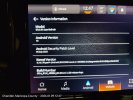
I dont know if I have (R5T) version. Pic below of my current software versions. Unless i dont know how to get the info on my non-Nav version.
I had the UConnect error starting 2 months post-buying the truck
5 visits to the dealer, they replaced antennas and the telematic module a few times with no effect.
Since Nov. of 2025, the UConnect error went away.
Then starting today, it is back again. So my deduction is the patch roll out in Oct/Nov of 2025 fixed the issue.
Now, since the patch rollout started again, it maybe causing the return of the UConnect error again.
I dont know if I have (R5T) version. Pic below of my current software versions. Unless i dont know how to get the info on my non-Nav version.
I had the UConnect error starting 2 months post-buying the truck
5 visits to the dealer, they replaced antennas and the telematic module a few times with no effect.
Since Nov. of 2025, the UConnect error went away.
Then starting today, it is back again. So my deduction is the patch roll out in Oct/Nov of 2025 fixed the issue.
Now, since the patch rollout started again, it maybe causing the return of the UConnect error again.
Attachments
- Joined
- Apr 11, 2019
- Messages
- 2,510
- Reaction score
- 3,020
- Points
- 113
You won’t find the telematics box version anywhere in your radio. If it updated from R5N to R5T back in November, it wouldn’t have updated to R5T again yesterday.I guess I was not clear enough.
I dont know if I have (R5T) version. Pic below of my current software versions. Unless i dont know how to get the info on my non-Nav version.
I had the UConnect error starting 2 months post-buying the truck
5 visits to the dealer, they replaced antennas and the telematic module a few times with no effect.
Since Nov. of 2025, the UConnect error went away.
Then starting today, it is back again. So my deduction is the patch roll out in Oct/Nov of 2025 fixed the issue.
Now, since the patch rollout started again, it maybe causing the return of the UConnect error again.
azzx
Ram Guru
Jimmy,You won’t find the telematics box version anywhere in your radio. If it updated from R5N to R5T back in November, it wouldn’t have updated to R5T again yesterday.
Is this the correct screen to find the version?
Thanks










