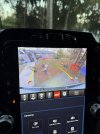
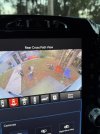
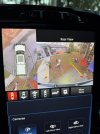
In regards to 2022 and newer 1500's with the UConnect 5 system and Surround View cameras is there a way to turn on/off the surround view when in reverse? I find it useless and always reaching over to hit the reverse camera soft key as that is a far more useful view being 10x bigger. Is there a way to turn off the surround view or be able to at least auto turn on just the reverse camera when shifting into reverse?
Also, gridlines both dynamic and static have never worked during my ownership of this truck (preowned) all but once randomly did they appear, so have no history on the previous owners' doings. Any insight on that? Settings in BCM are correct and within the radio, tried everything including battery disconnect, bcm reset, radio hard reset, radio soft reset, cleared all settings and restarted fresh... nothing has done the trick. Software is the 27 variant.
Also, gridlines both dynamic and static have never worked during my ownership of this truck (preowned) all but once randomly did they appear, so have no history on the previous owners' doings. Any insight on that? Settings in BCM are correct and within the radio, tried everything including battery disconnect, bcm reset, radio hard reset, radio soft reset, cleared all settings and restarted fresh... nothing has done the trick. Software is the 27 variant.