5thGenRams Forums

Register a free account today to become a member! Once signed in, you'll be able to participate on this site by adding your own topics and posts, as well as connect with other members through your own private inbox!

HOW TO: Add Passive Entry To 2025+

Jimmy07

Honorary Site Supporter
Site Supporter
Joined
Apr 11, 2019
Messages
2,478
Reaction score
2,970
Points
113
I’ve got the passive entry install figured out on the 2025-2026 Ram 1500, so here’s the write-up.
This is a bit complicated and can be expensive, not due to the parts and install, but due to what’s required to get it all programmed. More information n that in the programming post below, but figure on somewhere around $1000 for everything to get this added and working.

I’m not going to get too deep into explaining every detail of removing trim pieces and parts to run the custom harnesses, since there are plenty of videos of these 5th gen rams, but I’ll post video links as I find them.

Tools needed:
Trim panel remover
18mm socket (5 rear seat bolts)
E12 socket (4 rear seat bolts)
10 mm socket (door panel bolts, ground ring bolts)
7 mm socket (2 radio screen bolts)
T25 torx head- preferably a handheld “screwdriver” type, not a bit that goes into a drill apex. This is because the hole it has to go into might be to small for an apex to fit.

Parts:
*note- in all of the handle and cap part numbers, the two digits I have boxed in the example part number picture are the last two digits of your three digit paint code*
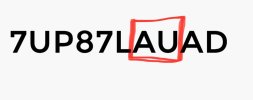
IMG_2721.jpeg
Left handles:
7UP87GW7AD
7UP87JWDAD
7UP87KXJAD
7UP87LAUAD
7UP87SSEAD
7UP87WCGAD
7UP87ZG9AD
7UP87ZR6AD

Left caps:
6CV50GW7AC
6CV50JWDAC
6CV50KXJAC
6CV50LAUAC
6CV50SSEAC
6CV50WCGAC
6CV50ZG9AC
6CV50ZR6AC

Right handles:
7JY48GW7AG
7JY48JWDAG
7JY48KXJAG
7JY48LAUAG
7JY48SSEAG
7JY48WCGAG
7JY48ZG9AG
7JY48ZR6AG

Right caps:
6CV52GW7AB
6CV52JWDAB
6CV52KXJAB
6CV52LAUAB
6CV52WCGAB

Rear antenna- Need to verify. This won’t apply right now. It is needed only for making the tailgate handle passive open, but I’ll just focus on the doors for now.
IMG_2673.jpeg

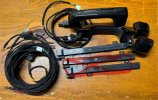
For my custom harness that adds the missing passive entry wiring, there’s three separate harnesses (4 when installing the rear antenna):
One for inside the passenger door, one for inside the driver door, and one for the cab. The one in the cab runs from the passenger door main body connector across the dash to the driver door main body connector, and also from the passenger door body connector down the front and rear passenger doors sills, to a main rf hub connector on the back cab wall.
 
Last edited:
INSTALL

Start off by removing everything in the cab necessary to run the cab harness:
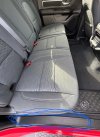
Pull out all the floor mats, passenger seat tire jack cover and equivalent driver seat cover, and front driver and passenger door sill trim (just using trim panel removal tool):
IMG_2722.jpeg
Pull rear passenger door sill trim:
IMG_2723.jpeg
Pull the lower passenger B-pillar trim panel (the one that the front passenger seat belt strap runs behind), and the smaller pillar trim panel below that on the floor.
This is all done to tuck the cab harness under the door sill carpet on the way back to the back cab wall.

Remove the rear seats:
Remove the rear cab wall insulation pad (3 plastic push pins).
*NOTE- rear seat removal may not be necessary in the future, if I can find substitutes for certain connector terminals that aren’t currently available. But, for now, we have to do it with the seats out**

Remove the insulation closeout panel under the glovebox (3 plastic push pins).

Remove the radio screen/bezel. This is to expose an opening in the center of the dash to fish the harness across the dash.

Next, move onto the door handles/door harness install. Back to the cab harness after the doors. The easiest way to do this is by following Infotainment’s instructions. The only difference will be instead of there being two wires, there will be four. Instead of inserting into the pin positions in the video, you’ll be using positions 1, 2, 6, & 7 on the brown connectors on both doors. After you install the handles and run the harness, you can put the door panel back together, but leave the rubber door boot from the door to cab undone.
**IMPORTANT NOTE ON THE DOOR HANDLES: In the video it is mentioned that the driver and passenger handles are the same. While this is true for 2019-2024, this is NOT THE CASE for 2025+. These handles are driver and passenger side “computer” modules on the CAN network, so pay attention to which part number door handle you put in which door**
 
Last edited:
INSTALL CAB HARNESS

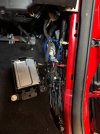
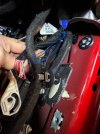
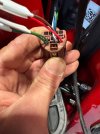
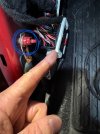
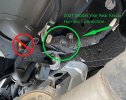
On the front passenger side floor, remove the bolt and white push pin holding the module to the side wall, lay it down on the floor (still plugged in), and pull the plastic Christmas tree pin holding down the various wiring to get the connector pictured below freed up. You need to be able to disconnect that connector to insert a wire:
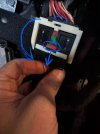
To disconnect, slide the red tab back, depress the black tab in front of the white lever, and lift the while lever until it rotates all the way back, kind of “ratcheting” the connector halves apart.
IMG_2679.jpeg
IMG_2680.jpeg

Disconnect the brown and white door connectors that come out of the cab to the rubber door boot.
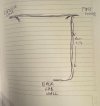
This is a crude sketch of the harness design, for reference of how you’re going to start fishing the harness to the hole for the door connectors:
IMG_2724.jpeg
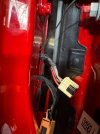
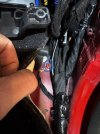
Tape a sturdy wire or long zip tie to the passenger door end of the harness (the end with the four female socket terminals). Start inserting it as you see the wire in the pic below, and pull it through the hole with the door connectors:
IMG_2683.jpeg
IMG_2684.jpeg
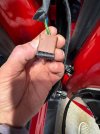
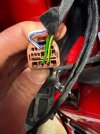
Unlock the brown connector so the four terminals can be inserted into positions 1, 2, 6, & 7 by pulling out the black face plate:
IMG_2685.jpeg
IMG_2686.jpeg
IMG_2687.jpeg
Plug those back in, reassemble the rubber door boot, and insert the boot back into the hole.
Inside the cab at the passenger floor, you have a wire with a ground ring, and a wire with male terminal labeled 5.
The ground ring attaches to this ground point just under the front passenger floor carpet:
IMG_2681.jpeg
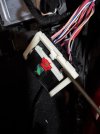
On that lever connector you disconnected earlier, unlock connector half that has the lever on it by prying up the white locking bar:
IMG_2688.jpeg
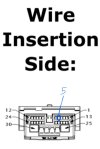
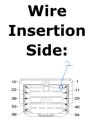
Insert the wire into position 5, press the locking tab back down, plug connector halves back together making sure it fully ratchets back together.
Reattach all the wire harness looms in that area, and screw that module back in place.
 
Last edited:
Pic of #5 wire insertion position for the connector with the lever:

IMG_2725.jpeg

Run the driver side end of the harness under the glovebox, and across the dash to the driver door, reinstalling the glovebox closeout panel and radio screen along the way.

Fish the four wires with female socket terminals to the door connector hole. Insert those four wires into the brown connector exactly like the passenger side, reassemble the door boot, and reinsert it back into the door cab hole.

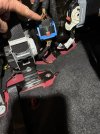
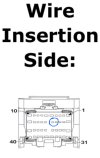
On the driver side kick panel floor, this is the ground bolt for the ground ring, and the lever connector for the wire labeled 2. Same as passenger side, disconnect and unlock that lever connector, and insert the wire into position 2:
IMG_2696.jpeg


IMG_2726.jpeg

After that, you can put the driver door sill trim and seat cover back on, and all done on the driver side.
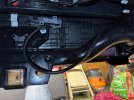
Next, back on the passenger side, run the last cab section of harness down the passenger door sills under the carpet to the back wall of the cab. You’re going to this connector location:
IMG_2698.jpeg
Disconnect that blue lever connector, and locate the tan wire and the yellow/tan wire in positions 14 & 15 of the connector with the lever. Use the posi-taps to tap the appropriately labeled wires from my harness into them.
IMG_2727.jpeg

**NOTE- Once you tap those two wires, and you start the truck after that, you are at the point of no return. Meaning, you’re at the point the dash will throw errors with the flashing odometer because the new handle modules are on the network, but haven’t been “properly introduced” to the rest of the modules on the truck. Even if you disconnect them, only a proxi alignment will remove the dash errors and flashing odometer. You’ll still be able to drive the truck fine, but no ABS.
So, tapping those wires is the point you are committed to making the alfaobd changes, and running the proxi alignment in the near future. Otherwise, wait until you are ready to do that.

Now you can put the seats back in, and the rest of the trim, and it’s ready for the programming part (continued in post #6).
 
Last edited:
For the programming, this post will be geared towards those that are already familiar with alfaobd in general, are going to use the exact tools I have listed, and are going to use the dealership to run the Proxi alignment.

**I am going to create a detailed thread dedicated to how to use alfaobd on these 2025+ 1500’s, unlocking the gateway, and running proxi alignments yourself. Once I have it up, I will insert a link to it right below this paragraph. IF YOU ARE GOING TO TRY TO USE ANY OTHER tool to unlock the gateway besides what I have listed, READ THROUGH THAT THREAD BEFORE PROCEEDING**

Tools needed:
- OBD splitter- https://a.co/d/atICJK2
- Xtool A30M- https://a.co/d/iJBtPxs
- Xtool Anyscan app
- AutoAuth account with one year subscription ($50)- AutoAuth
- Android version of alfaobd (windows version has issues running the “write custom configuration”)
- Bluetooth interface for alfaobd (preferably vlinker MC+, vlinker FD, or OBDLink MX+)

So basically, there’s three things that need to be done to do all the programming:
Use the OBD splitter to plug in both the Xtool and the alfaobd Bluetooth interface into the OBD port. Unlock the gateway with the Anyscan app. Connect alfaobd to the body computer to make the changes. Have the dealer run a proxi alignment.

Steps:
Schedule an appointment at the dealership to do a proxi alignment. (Probably set this appointment up, then base your install time just before the appointment).

Before you do anything, you’ll need to send me your backup file from alfaobd. There is one setting that isn’t present, so I need to tell you which number in your backup file to change when you write the custom configuration.
Plug the alfaobd Bluetooth interface into the OBD port, connect it to alfaobd.
Choose Jeep as the vehicle, Grand Cherokee WL as the model, body controller, MY 2021+, connect.
Click the car with hood open in the lower right.
Drop down the menu and select proxi tools, then select backup proxi configuration and hit start. Once complete, it will give you the path to that file on your device. Open that file, copy and paste it in a direct message to me. Close out alfaobd.

Set up an auto auth account, and buy a 1 year subscription. This will unlock the gateway on an unlimited amount of VINs for an unlimited amount of times for a year, and can register up to 5 tools to it.
Register the Xtool serial number to your auto auth account.
Plug the Xtool into the OBD splitter, open the Anyscan app, and download all of the vehicle brand drivers.
Once the drivers are installed and updated, select diagnose > dodge > manual connect > 2025 > DT 1500.
Continue to unlock the gateway when prompted, and enter your auto auth user name and password.
Once is says gateway successfully unlocked, don’t click continue. Just move on to alfaobd.

Plug the alfaobd Bluetooth interface into the other open port on the OBD splitter, connect it to alfaobd. Same as above, connect to the jeep grand Cherokee WL body computer > car with hood open in lower right > drop down menu > car configuration change, and change the following:
Passive Entry Present- Present
Passive Entry Menu- Present
Passive Entry Type- Four Door

Drop down the menu box up top, scroll to proxi tools, backup proxi configuration, start.
Drop down proxi tools box, select write custom configuration, start, select read from file, select the proxi file that you JUST backed up (most recent one).
Change the second digit in the 31st pair to the letter or number that I told you from your original backup file you sent me. Click write. Once procedure complete, backup the configuration again. This newest backup file will be your new original backup file with passive entry included (for future reference as a quick restore point).

After you do this, the truck will be extremely pissed off at you, and it’ll throw pretty much every warning it has at you on the dash. Don’t be alarmed, the truck is still drivable, you just won’t have ABS or traction control, etc.

Take the truck to the dealer, and tell them to run the proxi alignment, and clear the DTCs afterwards.
Make sure to tell them under no circumstances is the tech to restore the vehicle configuration. If they do that, then all your passive entry settings will revert back to original. So, ONLY proxi alignment and clear DTCs.

After that, you should be all set:
 
Last edited:
Damn. Now I need to do this in my rear doors!


Sent from my iPhone using Tapatalk
 
Damn. Now I need to do this in my rear doors!


Sent from my iPhone using Tapatalk
That actually might not be possible. Unlike the pre-2025 door handles (which just had sense and return wires), these 2025+ handles are nodes on the CAN FD network. The truck might not like seeing two additional identical front door handle modules hooked up to the network at the same time.
 
That actually might not be possible. Unlike the pre-2025 door handles (which just had sense and return wires), these 2025+ handles are nodes on the CAN FD network. The truck might not like seeing two additional identical front door handle modules hooked up to the network at the same time.

Well that’s not fun. Not having them on the rear when you have kids is frustrating to say the least.


Sent from my iPhone using Tapatalk
 
Thank you for the write up. This is on my to do list.


Sent from my iPhone using Tapatalk
 
REAR ANTENNA INSTALL
Part number- 68593565AA

The rear antenna installs on the backside of the rear bumper in a plastic bracket/cradle behind the license plate.
The purpose of this antenna is so the tailgate handle will be passive entry also.
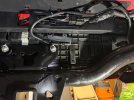
The connector for the antenna isn’t present, so you’ll have to install a short custom harness that pins into the chassis connector directly above the driver side exhaust resonator.
To install this harness, it’s the same instructions as the 2021+ antenna install linked below. Start by lowering, and moving the spare tire out of the way.

Unlike the smaller, pre-2025 rear antenna, this longer one will not slide into the plastic cradle without removing the rear bumper. I wasn’t about to get into all of that, so I just slid it in from the driver side as far as it would go until it wedged, then zip-tied it in place.
IMG_2755.jpeg
IMG_2756.jpeg
 

Users who are viewing this thread

Back
Top