5thGenRams Forums

Register a free account today to become a member! Once signed in, you'll be able to participate on this site by adding your own topics and posts, as well as connect with other members through your own private inbox!

Car Play Disconnect

Touchdwn

New Member
Joined
Sep 16, 2025
Messages
1
Reaction score
0
Points
1
Age
70
My 2026 Ram Tungsten has had car play stop functioning twice. The first time I called the service line and we eventually got it working with a radio reset. It happened agin this morning and I haven’t been able to reconnect. The man who helped me the first time said there have been some glitches with the new iPhones. Is anyone else experiencing this?
 
Yes, Apple CarPlay disappears from the system settings page. Android auto is still there but not CarPlay. Even plugging in with usb-c does nothing. Only cycling the ignition brings it back, usually. As a matter of fact bluetooth connection doesn't work when it goes out. This isn't a cut out after driving it is a fail to launch at vehicle startup, for me. It's an iPhone issue hahaha.
 
So far my main issues with CarPlay happen if I have a VPN connection established on my phone, it seems to prevent the connection. Usually when I turn it off, CarPlay connects. I do remember having to reset the radio in the past to also get CarPlay to start working, but that doesn't seem to be that often for me. I have more issuse with uconnect freezing and rebooting when I start up my truck and start driving.
 
Had my '26 Tungsten for 3 weeks. iPhone 15 Pro, IOS 26.0 (I think) and CarPlay wireless setup and connection seemed to operate just fine. I updated to iOS 26.1 and now can't get CarPlay to work. Tried everything including deleting RAM/iPhone pairing in iPhone & Uconnect, restarting iPhone, restarting UConnnect (hold down both knobs). Just won't work any longer. Pairing is succesful with phone and BT audio working - CarPlay just won't work.
 
So far my main issues with CarPlay happen if I have a VPN connection established on my phone, it seems to prevent the connection. Usually when I turn it off, CarPlay connects. I do remember having to reset the radio in the past to also get CarPlay to start working, but that doesn't seem to be that often for me. I have more issuse with uconnect freezing and rebooting when I start up my truck and start driving.
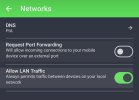
You can enable local LAN access in your VPN client and it should fix that issue. Some VPN clients may call it something different; PIA calls it "Allow LAN traffic".

Screenshot_20251116_124225_PIA VPN.jpg
 
Last edited:
Had my '26 Tungsten for 3 weeks. iPhone 15 Pro, IOS 26.0 (I think) and CarPlay wireless setup and connection seemed to operate just fine. I updated to iOS 26.1 and now can't get CarPlay to work. Tried everything including deleting RAM/iPhone pairing in iPhone & Uconnect, restarting iPhone, restarting UConnnect (hold down both knobs). Just won't work any longer. Pairing is succesful with phone and BT audio working - CarPlay just won't work.
FYI for anyone with iOS 26 issues - I upgrade to iOS 26.2 (Developer's Beta) and my phone connected via CarPlay with no issues.
 
FYI for anyone with iOS 26 issues - I upgrade to iOS 26.2 (Developer's Beta) and my phone connected via CarPlay with no issues.

New iOS 26.2 is available to public. I had issues with audio cutting out using CarPlay on 26.1 and updated to 26.2 last night. So far no issue.


Sent from my iPhone using Tapatalk
 

Users who are viewing this thread

Members online

Back
Top