5thGenRams Forums

Register a free account today to become a member! Once signed in, you'll be able to participate on this site by adding your own topics and posts, as well as connect with other members through your own private inbox!

Help! Swapping to a 2025+ Ram 1500 Dual Wireless Charger

KingBehr

Member
Joined
Sep 22, 2023
Messages
8
Reaction score
2
Points
3
Age
38
Ok hear me out. I actually use my wireless charger and wouldn't mind having the space for 2 phones. Has anyone else considered upgrading to dual chargers? The bezel is only $120 but I'm struggling to find the charging pads that fit behind it. Could someone help me locate the correct pads.

Yes I am aware of the additional ports that won't work but I am working on a possible work around.
View attachment a6470081dcb1de5e9c7a9a5eb1c3c54c.webp
 
the problem with OE wireless charger is the slow slow speed because on iPhones you get like 7.5w of charger instead of full 15w of charge on non certified chargers. OE wireless chargers fall into the non-certified charger category. that's why it takes longer to charge when the phone is being used to run navigation while playing music at the same time.
this is my most recent workaround:

parts needed:
Procedure:
  1. Unpack charger and adapter (I used 110v adapter with dual USB-C because I am also charging my iPad mini 6 for trail navigation using Gaia GPS. Gaia GPS is horrible when projected on Carplay and the built in USB-C cannot supply the power needed to charge and run the device with screen on at full brightness. In fact, it actually slowly drains the battery over time)
  2. Trim your Velcro Tape to size that runs across the charger completely, peel the backing tape, then attach it to your charger. Then, peel the other backing tape, cut the VHB to the size of the Velcro strap, and attach it.
  3. Prep the rubberized surface of the OE phone holder, just wipe it down so there's no dirt.
  4. Attach your wireless charger to your phone, be sure to rotate it so the wire comes out from the TOP, not side or bottom. This is very important and will be explained later.
  5. Place your phone to the OE phone holder with the charger attached. The glue on VHB should hold it in place when you remove the phone.
  6. Remove phone, with the charger still held in place to the phone holder, press firmly onto the charger to create bonding pressure.
  7. Stuff the wire coming out from the charger to the side of the OE holder so that the rubber pad holds the wire in place. Creating some tension on the wire will also help. Stuff the extra wires to the side of rubberized pad if there's not enough tension, then route it to the bottom where the 110v plug is.
  8. Attach USB-C plugs into the ports of the 110v adapter, and plug into the outlet.
  9. Repeat for the second phone location.
  10. Installation is complete. Go crack open a cold one and enjoy.
Notes:
  • If you're only using one device, then the 110v adapter with dual usb-c output can be omitted. The anker wireless charger comes with its own 110v adapter.
  • Velcro Tape is used to create a bigger flat bonding/ contacting area for the 3M VHB. Using 3M VHB by itself will not be enough to hold the charger in place due to the curved surface of the Anker Wireless charger. I have experimented with it and learned this after seeing how little contact marks were left on the VHB when my charger fell off in the heat.
  • Having the wires come out from the top and create tension by stuffing the wire to the side is important, because it helps to take the pressure off the VHB tape. The rubberized surface on the OE phone holder is not an ideal surface for any type of double sided tape, including VHB which is one of the best automotive adhesive tape there is. That's just the way it is. However, by creating tension on the wire/ cable, when it gets hot inside the cab and the adhesive does not work as well due to small contact area due to charger's curvature, the wire/ cable will be countering the weight of the charger and fight against gravity to hold the charger in place. Simple physics. I also learned this after having my charger fell off when the cab gets over 120F last week.
  • Be sure to buy the real 3M branded products (Velcro and VHB). Knockoffs are cheaper, but the adhesive property is no match to the real deal.
  • Be sure to buy heavy duty, outdoor rated Velcro tape

Another benefit of doing wireless charger this way is you can always upgrade your charger later. Wireless chargers will degrade/ break overtime. My last one (different brand) lasted a bit over a year and then I noticed it got slower, and sometimes it would giving me interference errors after 5 minutes of charging. So I finally decided to upgrade. Doing it this way means the least amount of work needed to upgrade, as well as ensures you have the fastest possible charging speed. If you do a quick search, plenty of users have complained about the slow charging speed on OE chargers.

Hope this helps.

 
the problem with OE wireless charger is the slow slow speed because on iPhones you get like 7.5w of charger instead of full 15w of charge on non certified chargers. OE wireless chargers fall into the non-certified charger category. that's why it takes longer to charge when the phone is being used to run navigation while playing music at the same time.
this is my most recent workaround:

parts needed:
Procedure:
  1. Unpack charger and adapter (I used 110v adapter with dual USB-C because I am also charging my iPad mini 6 for trail navigation using Gaia GPS. Gaia GPS is horrible when projected on Carplay and the built in USB-C cannot supply the power needed to charge and run the device with screen on at full brightness. In fact, it actually slowly drains the battery over time)
  2. Trim your Velcro Tape to size that runs across the charger completely, peel the backing tape, then attach it to your charger. Then, peel the other backing tape, cut the VHB to the size of the Velcro strap, and attach it.
  3. Prep the rubberized surface of the OE phone holder, just wipe it down so there's no dirt.
  4. Attach your wireless charger to your phone, be sure to rotate it so the wire comes out from the TOP, not side or bottom. This is very important and will be explained later.
  5. Place your phone to the OE phone holder with the charger attached. The glue on VHB should hold it in place when you remove the phone.
  6. Remove phone, with the charger still held in place to the phone holder, press firmly onto the charger to create bonding pressure.
  7. Stuff the wire coming out from the charger to the side of the OE holder so that the rubber pad holds the wire in place. Creating some tension on the wire will also help. Stuff the extra wires to the side of rubberized pad if there's not enough tension, then route it to the bottom where the 110v plug is.
  8. Attach USB-C plugs into the ports of the 110v adapter, and plug into the outlet.
  9. Repeat for the second phone location.
  10. Installation is complete. Go crack open a cold one and enjoy.
Notes:
  • If you're only using one device, then the 110v adapter with dual usb-c output can be omitted. The anker wireless charger comes with its own 110v adapter.
  • Velcro Tape is used to create a bigger flat bonding/ contacting area for the 3M VHB. Using 3M VHB by itself will not be enough to hold the charger in place due to the curved surface of the Anker Wireless charger. I have experimented with it and learned this after seeing how little contact marks were left on the VHB when my charger fell off in the heat.
  • Having the wires come out from the top and create tension by stuffing the wire to the side is important, because it helps to take the pressure off the VHB tape. The rubberized surface on the OE phone holder is not an ideal surface for any type of double sided tape, including VHB which is one of the best automotive adhesive tape there is. That's just the way it is. However, by creating tension on the wire/ cable, when it gets hot inside the cab and the adhesive does not work as well due to small contact area due to charger's curvature, the wire/ cable will be countering the weight of the charger and fight against gravity to hold the charger in place. Simple physics. I also learned this after having my charger fell off when the cab gets over 120F last week.
  • Be sure to buy the real 3M branded products (Velcro and VHB). Knockoffs are cheaper, but the adhesive property is no match to the real deal.
  • Be sure to buy heavy duty, outdoor rated Velcro tape

Another benefit of doing wireless charger this way is you can always upgrade your charger later. Wireless chargers will degrade/ break overtime. My last one (different brand) lasted a bit over a year and then I noticed it got slower, and sometimes it would giving me interference errors after 5 minutes of charging. So I finally decided to upgrade. Doing it this way means the least amount of work needed to upgrade, as well as ensures you have the fastest possible charging speed. If you do a quick search, plenty of users have complained about the slow charging speed on OE chargers.

Hope this helps.
Thank you for the write-up and I do like your reasoning and I think I may go this route! Do you have any pictures or video of your build?
 
Ok hear me out. I actually use my wireless charger and wouldn't mind having the space for 2 phones. Has anyone else considered upgrading to dual chargers? The bezel is only $120 but I'm struggling to find the charging pads that fit behind it. Could someone help me locate the correct pads.

Yes I am aware of the additional ports that won't work but I am working on a possible work around.
View attachment 200679

With you OP. Could care less about the oem performance and any aftermarket solutions so this is only for those that want stock and wish these threads started wouldn't get diluted with off topic stuff.

I am currently trying to work out how to get a 25+ dual charger to work in my 22. I have a complete unit with modules and wiring.

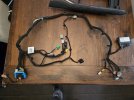
The 19-24 plug fits the driver side one, but the 25+ wiring has two additional wires that the 19-24 does not and those 2 additional wires lead to the back of the console where there is a module that I cannot find any information on.

The passenger side wireless charger I simply spliced on the green connector for it as it just uses 3 wires same as the 19-24.

In the end the truck is not recognizing the either charger thus they dont work.

Oddly the usb ports including the passenger dedicated set next to the hdmi work fine. The strange part is the passenger dedicated usb a/c ports only use the ambient lighting circuit, so at night those ports light up along with the hdmi (which is for the passenger dash screen, planning on that mod next) which the usb charges phones...

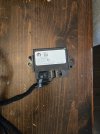
So my theory is on this mysterious module in the rear of 25+ floor consoles (possibly later 24 builds) is it controls the wireless chargers and possibly has alot to do with others who have tried the passenger screen, this may be the missing piece to solve it all.
 
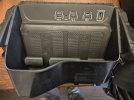
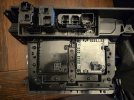
And to mention the wireless modules that mount on the backside are not interchangeable so the 19-24 do not fit the 25+ and vice versa. They are physically different. I even tried disassembling the casing to retrofit and, you just cannot.
 
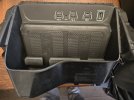
Some pics for reference. Below is the 25+ floor console wire harness out of a Laramie G/T so had the console shifter, part number 68600895AB, is the same for TRX, RHO, Rebel X, Rebel G/T and Laramie G/T.

Same harness minus shifter wires for non-console version trucks is 68600894AB WITH passenger screen.

Non passenger screen and non-shifter p# is 68600891AB which this has dual wireless charger and no module in the back of the console... makes it frustrating trying to figure it all out...

No passenger screen but with shifter so wouldn't have the module in back of the console, p# unknown at this time.


20251124_093010.jpg


20251124_093029.jpg

20251125_091238.jpg

20251126_192425(1).jpg

20251112_082848.jpg


20251112_082923.jpg
 

Attachments

  • 20251112_082848.jpg
    20251112_082848.jpg
    140.6 KB · Views: 1
Last edited:

Users who are viewing this thread

Back
Top