

- Joined
- Oct 26, 2024
- Messages
- 439
- Reaction score
- 1,589
- Points
- 93
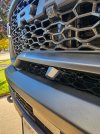
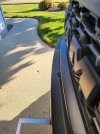
Got inspired to relocate the front bumper cam
Old location:
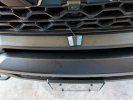
New location:
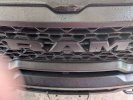
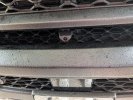
Old location:
New location:
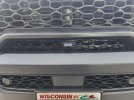
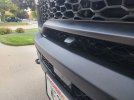
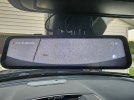
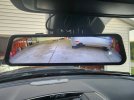
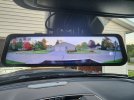
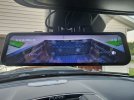
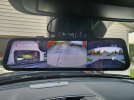

I put a Wolfbox in my 21 Limited love it.Not sure if anyone is still looking to add the front facing camera. I came across the Wolfbox G900. You get a front camera, dash camera, rear camera, and gps. It's viewer attaches to the rearview mirror. I think this the route I'm taking for the '25 Rebel.
Wolfbox
I have the Wolfbox in my 21st Limited strapped to the mirror works great.I was literally about to purchase one of these today, but had some concerns about strapping it to the existing mirror (don’t want to lose side dimming mirrors, auto high beams, etc). How did you end up mounting it, and did you have any issues?
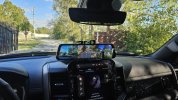
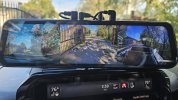
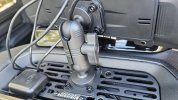
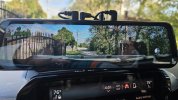
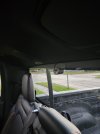
I installed this today. I didn’t want to mount it over the mirror and didnt want to use the adhesive on the dash, so i mounted it with the bulletproofmountingsystems dash mount. I attached one of the mounting ball plates to the back of the OEM bracket on the display. The cables were ran up through the dash. I mounted the front camera in the same location as @TJHUB. I mounted the rear camera on the passenger side to avoid the sliding glass, but I think I will move it to the center and adjust the angle instead. Thank you to everyone that posted their installation process in this thread, it helped me a ton. My only complaint is the g force sensor is too sensitive on the lowest setting. It kept going into emergency mode when I drove on the highway. That may be a result of how I mounted it, but I just turned off the g sensor. Otherwise I am very pleased with how this turned out and the quality of the cameras.View attachment 207360View attachment 207361View attachment 207362View attachment 207363

I'm in the same boat/ Mine is a 2026 Laramie with the 3.0 I6 Hurricane SO and it only came with a rear camera. I have the same question. I didn't know that I'd miss the front camera that my Wrangler had so badly.Any updates from anyone on adding a front camera to 2025 RAM? I have a 2025 Texas Editions (basically a BIGHORN) with the 3.0 I6 Hurricane SO and it only came with a rear camera. Any idea what it would cost if we just took truck to a RAM dealership and asked them to install one?
I installed this today. I didn’t want to mount it over the mirror and didnt want to use the adhesive on the dash, so i mounted it with the bulletproofmountingsystems dash mount. I attached one of the mounting ball plates to the back of the OEM bracket on the display. The cables were ran up through the dash. I mounted the front camera in the same location as @TJHUB. I mounted the rear camera on the passenger side to avoid the sliding glass, but I think I will move it to the center and adjust the angle instead. Thank you to everyone that posted their installation process in this thread, it helped me a ton. My only complaint is the g force sensor is too sensitive on the lowest setting. It kept going into emergency mode when I drove on the highway. That may be a result of how I mounted it, but I just turned off the g sensor. Otherwise I am very pleased with how this turned out and the quality of the cameras.View attachment 207360View attachment 207361View attachment 207362View attachment 207363
Do you happen to know the pay number that you used to attach the wolfbox to the mounting arm? The part that attached to the wolfbox?I installed this today. I didn’t want to mount it over the mirror and didnt want to use the adhesive on the dash, so i mounted it with the bulletproofmountingsystems dash mount. I attached one of the mounting ball plates to the back of the OEM bracket on the display. The cables were ran up through the dash. I mounted the front camera in the same location as @TJHUB. I mounted the rear camera on the passenger side to avoid the sliding glass, but I think I will move it to the center and adjust the angle instead. Thank you to everyone that posted their installation process in this thread, it helped me a ton. My only complaint is the g force sensor is too sensitive on the lowest setting. It kept going into emergency mode when I drove on the highway. That may be a result of how I mounted it, but I just turned off the g sensor. Otherwise I am very pleased with how this turned out and the quality of the cameras.View attachment 207360View attachment 207361View attachment 207362View attachment 207363
One more question? Did you drill a hole in the dash for the wiring? Ok, two questions...did you remove the whole head unit to run the wiring?I tried to find a mounting position higher up to get a better view with the front bumper camera, but I was unsuccessful. I did end up flipping the camera over so the shaped part was up. This moved the camera out a bit and allowed for a steeper angle to the ground. I can now see about 13" in front of the bumper where it used to be closer to 18". Plus, the camera is more aerodynamic, so the truck feels faster now...
View attachment 207423
View attachment 207424











