
5thGenRams Forums
You are using an out of date browser. It may not display this or other websites correctly.
You should upgrade or use an alternative browser.
You should upgrade or use an alternative browser.
2023 Ram 1500 Limited - Trailer Surround Camera System 360 Installation - Working Solution
- Thread starter ndsvend01
- Start date

Laramieblue
Active Member
- Joined
- Aug 25, 2024
- Messages
- 119
- Reaction score
- 106
- Points
- 43
Just an FYI, there is another topic regarding this trailer camera that you folks might want to browse through, it has some interesting points and shows pictures of what the display should look like.

Anyone know what kit I need for a trailer camera for the new 25 ram 1500 tungsten already equipped for external cameras? I already have the connection on the rear to plug in cameras. 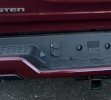
- Kilroy
- Replies: 100
- Forum: 5th Gen General Discussion

reeleezy73
New Member
- Joined
- Aug 24, 2023
- Messages
- 2
- Reaction score
- 0
- Points
- 1
- Age
- 52
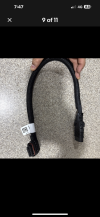
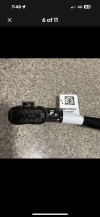
Has anyone figured out the part number for the harness above the 12 pin?
Attachments
reeleezy73
New Member
- Joined
- Aug 24, 2023
- Messages
- 2
- Reaction score
- 0
- Points
- 1
- Age
- 52
Madtrucker2021
Active Member
That is some nice trailer, who makes that, and you're pulling it with a Ram 1500In the process of installing the camera system on the trailer. I will get post installation pics up once done.View attachment 198653

I have this same setup from the factory with the 4/7 in the bumper as any other but then a metal box below the bumper with the 12/7 68382504AD. I have a 2022 1500 limited hemi. So for those out there wondering at least on 1500's that came equipped with the trailer surround view this is how it comes with two separate plug setups that are connecting together with a splitter. for 2500 or HD's the 12/7 68382504AD is in the bumper and no 4/7, then the aux single camera plug is on the left side of the plate in the bumper. 1500's did not get the single aux camera port and rather will need a 12 to 1 adapter to run a single cam in the aux port of the sytem/display.
Last edited:
what is the part number on the box for the set that came with yours? and is it a 1500? I have everything factory but second owner of my truck and first lost the tpms and cameras so I didnt get them with the truck. From what I gather these cameras and tpms sensors are very specific to an individual year, so I am seeking 22's.I got my truck on 2022 and it came with that box containing the 360 trailer camera kit, I’m thinking about installing it in my Rv, I see that you have a lot going on makes me wonder if I have to do all that as well I believe the connection you didn’t have on bottom of the bumper I do have it just to make sure can you send a pic of how everything looks hooked up on the truck ? I will upload picks about my set up as well I’m thinking the only thing I might need is the gateway module, do you know if they install those from factory or do I have to get one for sure
Where did you purchase the 12 pin connectors?In the process of adding the trailer surround camera system.
Took a bit of research to understand the different cameras and so on so this is my journey, maybe it will help somebody in the future.
I did not have a 12 pin connector on my bumper before starting.
I only had the 4/7 pin connectors on the bumper.
Parts list:
68527709AC - Trailer 360 Camera System
68522624AA - 7/12 pin connector that goes on the bumper
68525632AA - 12 pin harness (part of 5th wheel prep)
68509331AB - Trailer camera gateway module that goes behind the dash
Worked with the dealership to figure out some of this but they also referrenced the forum.
They enabled sales codes AHT and AHX which is what is associated with my truck instead of XN1 and this now shows the "Trailer" option under "Camera".
Before turning on the sales code the Trailer section was not there.
Under AUX there was AUX1 and AUX2 before turning on the sales codes. Now there is only AUX2 available.
View attachment 195916
I looked behind the dash for the wiring where the trailer camera gateway is going to be installed and the plugs were there and easily accessible and covered with tape.
Pending arrival of the gatway to install.
View attachment 195917 View attachment 195918
Underneath the truck I had to look around and see if there were any extra wires or harnesses.
Found a 12 pin connector that resembles the type of connection needed for the cameras. It was on the driver side above the exhaust.
It has a protective cap on it.
View attachment 195920 View attachment 195921
View attachment 195922
In theory, I should be able to take the harness purchased above and plug this in and the camera system should work.
Will update next week.
here is what you are after, grab it on ebay. Pardon Our Interruption...Where did you purchase the 12 pin connectors?
search item: 206138189254 on ebayWhere did you purchase the 12 pin connectors?

Sergei
New Member
- Joined
- Jan 21, 2025
- Messages
- 2
- Reaction score
- 0
- Points
- 1
- Age
- 50
I bought this kit on eBay. The wiring needs to be extended all over the truck and connected to a connector inside the cab, and there are only five wires in the harness. I already have a 12-pin connector above the muffler, which has ten pins. So why do I need this harness?Поиск товара: 206138189254 на eBay
Last edited:
daveemarcus
New Member
- Joined
- Jul 31, 2025
- Messages
- 1
- Reaction score
- 0
- Points
- 1
- Age
- 36
Hey everyone — I’m running into an issue with the trailer surround view system and wanted to see if anyone else has experienced this.
- Aftermarket install using OEM Mopar components and AlfaOBD programming
- System was fully working initially (all cameras recognized and functioning)
- After sitting overnight (no rain, nothing unusual), I started getting “Trailer camera system unavailable”
- No gradual degradation — it just suddenly stopped working
- Power at the module is good (~13.8–14V from truck 12 way connector)
- Ground is solid
- CAN bus at the 12-pin connector looks correct
- CAN High ≈ 3.16V
- CAN Low ≈ 1.78V
- Differential ≈ 1.3–1.6V
- So the truck appears to be broadcasting normally
- Full continuity check passed on all pins
- Minimal voltage drop on power pins (~0.3V)
- Bypassed the second harness section completely → no change
- Tried both 12-pin ports (bumper + bed) → same result
- Reseated everything multiple times
- Tried adjusting pins and applying pressure
- No change in behavior
- Module is getting full power
- It draws current (gets warm)
- But the truck never detects it and system stays unavailable
- Feature is enabled via AlfaOBD
- No settings were changed between when it worked and when it failed
- Power looks good
- CAN looks good
- Harness checks out
- Both 12-pin ports on the truck behave the same (bed and bumper)
- It seems like the module is powered but not communicating on CAN
- Has anyone else seen this happen?
- Did it end up being the module, wiring, or something else?
- Any known fixes besides replacing the module?

KotaBearHix
Member
- Joined
- Jan 23, 2023
- Messages
- 6
- Reaction score
- 0
- Points
- 1
- Age
- 39
Did you ever get this done?In the process of adding the trailer surround camera system.
Took a bit of research to understand the different cameras and so on so this is my journey, maybe it will help somebody in the future.
I did not have a 12 pin connector on my bumper before starting.
I only had the 4/7 pin connectors on the bumper.
Parts list:
68527709AC - Trailer 360 Camera System
68522624AA - 7/12 pin connector that goes on the bumper
68525632AA - 12 pin harness (part of 5th wheel prep)
68509331AB - Trailer camera gateway module that goes behind the dash
Worked with the dealership to figure out some of this but they also referrenced the forum.
They enabled sales codes AHT and AHX which is what is associated with my truck instead of XN1 and this now shows the "Trailer" option under "Camera".
Before turning on the sales code the Trailer section was not there.
Under AUX there was AUX1 and AUX2 before turning on the sales codes. Now there is only AUX2 available.
View attachment 195916
I looked behind the dash for the wiring where the trailer camera gateway is going to be installed and the plugs were there and easily accessible and covered with tape.
Pending arrival of the gatway to install.
View attachment 195917 View attachment 195918
Underneath the truck I had to look around and see if there were any extra wires or harnesses.
Found a 12 pin connector that resembles the type of connection needed for the cameras. It was on the driver side above the exhaust.
It has a protective cap on it.
View attachment 195920 View attachment 195921
View attachment 195922
In theory, I should be able to take the harness purchased above and plug this in and the camera system should work.
Will update next week.
KotaBearHix
Member
- Joined
- Jan 23, 2023
- Messages
- 6
- Reaction score
- 0
- Points
- 1
- Age
- 39
I have a 2026 Ram 1500 that came with the wiring already done and on the bumper. While I was researching, I came across one that mentions sales codes. They were working on a 2500, so I don't know if that is correct for the 1500s. Still doing research.Guys way to dig this out! I have everything ready to go but I seem to be missing the two connectors for the gateway module which is shocking to me. I ordered my 2023 15
00 with trailer cam wiring so I have the connector and harness to the uconnect from the bumper. I have looked high and low under the dash and see no taped up connectors for the camera gateway, any ideas? Did they really build with different harnesses? Or were these connectors only installed on 2500/3500 trucks? Thx for any help. One more detail, because I purchased the trailer camera install wiring - I tried just hooking up the 360 camera kit and it did show on my unconnect, but it was only via Aux1 and all the views were slammed on the left half of the display without the surround menuing on the uconnect. But I could see all the cameras. Is this just a matter of enabling the sales codes to get the correct display options? I have attached pictures of what I get when the camera system is connected. I can see them all through Aux1. However the views on the right dont selsct and defaults to rear view. This almost leads me to think I just need the sales codes activated? View attachment 200892View attachment 200893
AHT instead of XN1
So I’m a dumbass and ripped the camera harness (cable) out of its 12pin connector because I forgot to unplug it from the truck when I drove off. I’ve been looking for a replacement for like 2+ years. The part number on the harness is not available/discontinued. They still make the whole kit…. Did they change that part number or is it just impossible to buy one? The part number on the cable itself is
68526180AA
Any ideas how I can get just this main module to truck harness?
68526180AA
Any ideas how I can get just this main module to truck harness?
Users who are viewing this thread
Total: 1 (members: 0, guests: 1)
Site Vendors












Staff online
-
 EightyModerator / Dream Killer